Skip to content
Techoelite

Techoelite

Explore Software and Gaming, Stay Updated on Latest Gear, Embrace Smart Homes, Dive into the Social Scene, and Uncover Mobile Insights

Primary Menu
  • Home
  • Software And Gaming
  • Tech
  • Tips & Tricks
  • About
  • Contact Us
  • Home
  • Tech
  • Beyond Chatbots: How LigthPDF AI Agents are Redefining PDF Productivity through “Single-Command” Workflows

Beyond Chatbots: How LigthPDF AI Agents are Redefining PDF Productivity through “Single-Command” Workflows

Lynette Cain 3 min read
899

The “AI Revolution” in document management has reached a plateau. For the past two years, we’ve been told that “Chatting with your PDF” is the ultimate productivity hack. But the reality is more frustrating: after the AI summarizes your 50-page report, you still have to manually navigate a cluttered toolbar to compress it, convert it to Word, or scrub out watermarks.

You are still the operator. You are still doing the “manual labor” of file management.

However, a shift is happening. Tools like LightPDF AI Agent are moving away from passive conversation and toward active execution. The real story isn’t that AI can read; it’s that AI can finally work.

The “Tool Hopping” Tax: A Productivity Killer

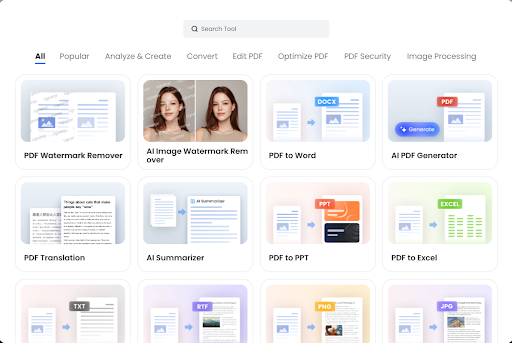
Most online PDF platforms function like a digital hardware store. If you have a complex task—say, taking three separate scanned reports, merging them, removing the watermarks, and then translating the final result—you have to perform a “Digital Triathlon”:

  1. Navigate to the OCR tool to make the scans readable.
  2. Jump to the Merge tool to combine them.
  3. Switch to the Watermark Remover to clean the pages.
  4. Finally, locate the Translation and Compression tools.

This “tool hopping” is a hidden tax on our time and mental energy. Even with “fast” web tools, the friction of uploading, processing, downloading, and re-uploading between different modules is immense.

The Rise of the Command-Based Workflow

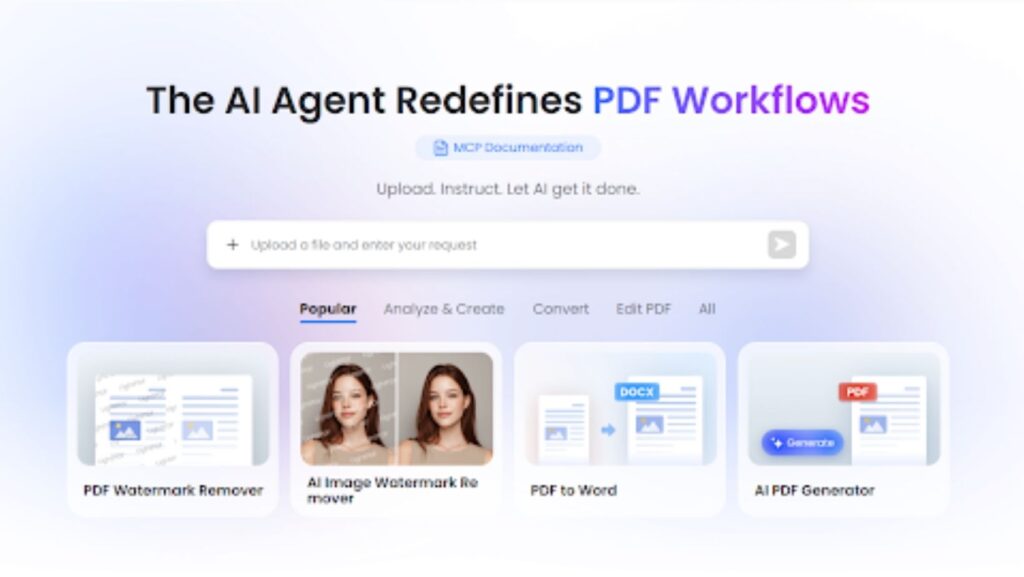
LightPDF AI Agent solves this by replacing the toolbar with a Command Interface. It treats the entire suite of PDF tools—conversion, generation, protection, editing, and compression—as a single, unified brain.

Instead of hunting for buttons, you simply state your intent:

“Hey, merge these three files, remove the watermarks, and compress the final version so I can send it via Slack.”

In that one sentence, the AI Agent orchestrates four different backend processes. It identifies the need for the Merger, triggers the Watermark Remover, executes the Compressor, and delivers the final product. What used to be a 10-minute multi-step process is reduced to a 10-second instruction.

What Makes an “Agent” Different from a “Chatbot”?

While standard PDF AI tools are limited to text analysis, LightPDF agent has Agency over the file structure.

  • Integrated Multi-Tasking: You can ask the agent to “Convert this PDF to a clean Excel sheet and highlight the rows related to Q4 taxes.” It doesn’t just talk about the data; it transforms the file format to make the data more useful.
  • Visual and Structural Intelligence: With advanced AI Image & PDF Watermark Removal, the agent can “see” distracting elements. You don’t have to manually select areas; the agent identifies and wipes them out upon request.
  • Automated Generation: You can feed the agent raw notes or ideas and command it to “Generate a structured, professional PDF proposal based on this text.” It handles the layout and formatting, moving from “content analysis” to “content creation.”

From “User” to “Director”

The competitive edge of LightPDF AI Agent lies in how it simplifies the user experience. Most web-based PDF tools require the user to understand the process (which tool to use and in what order). LightPDF only requires the user to understand the goal.

This shift is crucial for freelancers, legal professionals, and students who handle hundreds of documents weekly. When you have a “PDF AI Assistant,” you stop being the person who manages files and start being the person who directs the workflow.
The Future of Documents is Zero-Interface

The ultimate goal of productivity tech is to make the interface disappear. We are heading toward a “Zero-Interface” future where the GUI (buttons, menus, tabs) is secondary to the AI’s ability to execute commands.

LightPDF’s transition from a collection of web tools to a centralized AI Agent is a major step in that direction. It effectively kills the “Digital Triathlon” and replaces it with a conversation. If you’re still clicking through five different tools to finish one document task, you’re working in the past.


Continue Reading

Previous: AI Image Generators With No Restrictions: Marketing vs. Reality Check
Next: Overlooked Innovators Whose Ideas Predicted the Current AI Era Decades Ago

Trending Now

Games Not on GamStop: Unlock the Full Potential of Online Casinos 1

Games Not on GamStop: Unlock the Full Potential of Online Casinos

Solnadin Fonkas
The Rise of Pay N Play in Non GamStop Casinos UK 2

The Rise of Pay N Play in Non GamStop Casinos UK

Solnadin Fonkas
How to Prepare to Expand Your Construction Business 3

How to Prepare to Expand Your Construction Business

Solnadin Fonkas
The Smart Business Owner’s Guide to Choosing a Logo Maker 4

The Smart Business Owner’s Guide to Choosing a Logo Maker

Solnadin Fonkas
The Tech Behind Crash Games: Engineering India’s iGaming Boom 5

The Tech Behind Crash Games: Engineering India’s iGaming Boom

Kathleen Burrell
Baccarat for Beginners: Understanding the Simplest Casino Card Game 6

Baccarat for Beginners: Understanding the Simplest Casino Card Game

Solnadin Fonkas

Related Stories

Why Brand Sentiment in AI Answers Is the New Battleground for Tech Companies
3 min read

Why Brand Sentiment in AI Answers Is the New Battleground for Tech Companies

Folmedil Honlis 146
Www TechOEliteCom Analyzed: What It Is, Who It’s For, And How To Use It In 2026 www techoelitecom
4 min read

Www TechOEliteCom Analyzed: What It Is, Who It’s For, And How To Use It In 2026

Folmedil Honlis 182
Zap-Internet Explained: Fast, Simple Home And Small‑Business Internet In 2026 zap-internet
3 min read

Zap-Internet Explained: Fast, Simple Home And Small‑Business Internet In 2026

Folmedil Honlis 240
Leading Digital Rail Video Analytics Solutions for Rail Operators digital rail video analytics, rail operator video solutions, train safety analytics, rail security surveillance, railway video analytics software, train station monitoring, transportation video analytics, location-based rail analytics, rail infrastructure video solutions, train system security
4 min read

Leading Digital Rail Video Analytics Solutions for Rail Operators

Folmedil Honlis 391
12 Accurate GPS Tracking Devices in 2026
4 min read

12 Accurate GPS Tracking Devices in 2026

Kathleen Burrell 441
Killing the 9-to-5 Meeting Culture: A Playbook for Global Async Collaboration
7 min read

Killing the 9-to-5 Meeting Culture: A Playbook for Global Async Collaboration

Kathleen Burrell 449
6075 Tomalin Boulevard
Solan, TX 63457
techoelite.com
  • Home
  • Privacy Policy
  • T&C
  • About
  • Contact Us
© 2026 techoelite.com | All Rights Reserved.
We use cookies on our website to give you the most relevant experience by remembering your preferences and repeat visits. By clicking “Accept”, you consent to the use of ALL the cookies.
Do not sell my personal information.
Cookie SettingsAccept
Manage consent

Privacy Overview

This website uses cookies to improve your experience while you navigate through the website. Out of these, the cookies that are categorized as necessary are stored on your browser as they are essential for the working of basic functionalities of the website. We also use third-party cookies that help us analyze and understand how you use this website. These cookies will be stored in your browser only with your consent. You also have the option to opt-out of these cookies. But opting out of some of these cookies may affect your browsing experience.
Necessary
Always Enabled
Necessary cookies are absolutely essential for the website to function properly. These cookies ensure basic functionalities and security features of the website, anonymously.
CookieDurationDescription
cookielawinfo-checkbox-analytics11 monthsThis cookie is set by GDPR Cookie Consent plugin. The cookie is used to store the user consent for the cookies in the category "Analytics".
cookielawinfo-checkbox-functional11 monthsThe cookie is set by GDPR cookie consent to record the user consent for the cookies in the category "Functional".
cookielawinfo-checkbox-necessary11 monthsThis cookie is set by GDPR Cookie Consent plugin. The cookies is used to store the user consent for the cookies in the category "Necessary".
cookielawinfo-checkbox-others11 monthsThis cookie is set by GDPR Cookie Consent plugin. The cookie is used to store the user consent for the cookies in the category "Other.
cookielawinfo-checkbox-performance11 monthsThis cookie is set by GDPR Cookie Consent plugin. The cookie is used to store the user consent for the cookies in the category "Performance".
viewed_cookie_policy11 monthsThe cookie is set by the GDPR Cookie Consent plugin and is used to store whether or not user has consented to the use of cookies. It does not store any personal data.
Functional
Functional cookies help to perform certain functionalities like sharing the content of the website on social media platforms, collect feedbacks, and other third-party features.
Performance
Performance cookies are used to understand and analyze the key performance indexes of the website which helps in delivering a better user experience for the visitors.
Analytics
Analytical cookies are used to understand how visitors interact with the website. These cookies help provide information on metrics the number of visitors, bounce rate, traffic source, etc.
Advertisement
Advertisement cookies are used to provide visitors with relevant ads and marketing campaigns. These cookies track visitors across websites and collect information to provide customized ads.
Others
Other uncategorized cookies are those that are being analyzed and have not been classified into a category as yet.
SAVE & ACCEPT