Every time someone connects to a work computer from home, a coffee shop, or another country, that connection has to cross networks nobody fully controls.
What keeps the data inside that connection private is encryption, the process that scrambles information so only the intended device can read it. Encryption is the part of the system doing the heaviest lifting, yet it is the part most people never actually see, tucked behind a padlock icon or a setup checkbox. This guide breaks down how encrypted connections work inside a modern remote access solution, what standards actually matter, and what separates strong protection from a weak link that only looks secure on the surface.
Key Takeaways
- Encryption converts readable data into ciphertext, so intercepted traffic is useless without the correct decryption key.
- TLS 1.3 now secures roughly 76% of web pages, replacing older, weaker protocol versions.
- AES-256 remains the encryption standard behind most modern remote connections and government systems alike.
- Encryption was one of the strongest cost reducing controls in IBM’s 2025 breach cost research, cutting the average incident by over $200,000.
- The strongest setups pair encryption with device checks and authentication, since encryption alone cannot stop a stolen password.
What Is a Remote Access Solution?
A remote access solution is software that lets a person connect to and control a computer, server, or application from a separate device, anywhere with an internet connection. Support teams use it to fix a colleague’s laptop without visiting their desk, and remote staff use it to reach office systems from home.
None of that is useful without a way to keep the connection private. Choosing a reliable remote access solution for secure networks means the traffic between the two devices is encrypted the entire time, not just during login.
How Encryption Actually Protects a Remote Connection
Encryption takes readable data and turns it into ciphertext, a scrambled version that looks like random noise to anyone without the matching key. Even if traffic is intercepted mid-transit, the contents stay unreadable.
The Handshake That Happens Before Any Data Moves
Before a single keystroke or screen image travels between devices, the two ends perform a handshake. They agree on which encryption method to use, verify each other’s identity through a digital certificate, and generate a shared session key. This exchange typically takes milliseconds, but it decides how secure everything afterward will be.
Symmetric Encryption Does the Heavy Lifting
Once the handshake finishes, the session switches to symmetric encryption, where both sides use the same key to scramble and unscramble data. It is dramatically faster than the asymmetric methods used during the handshake, which is why it handles the bulk of an active remote session.
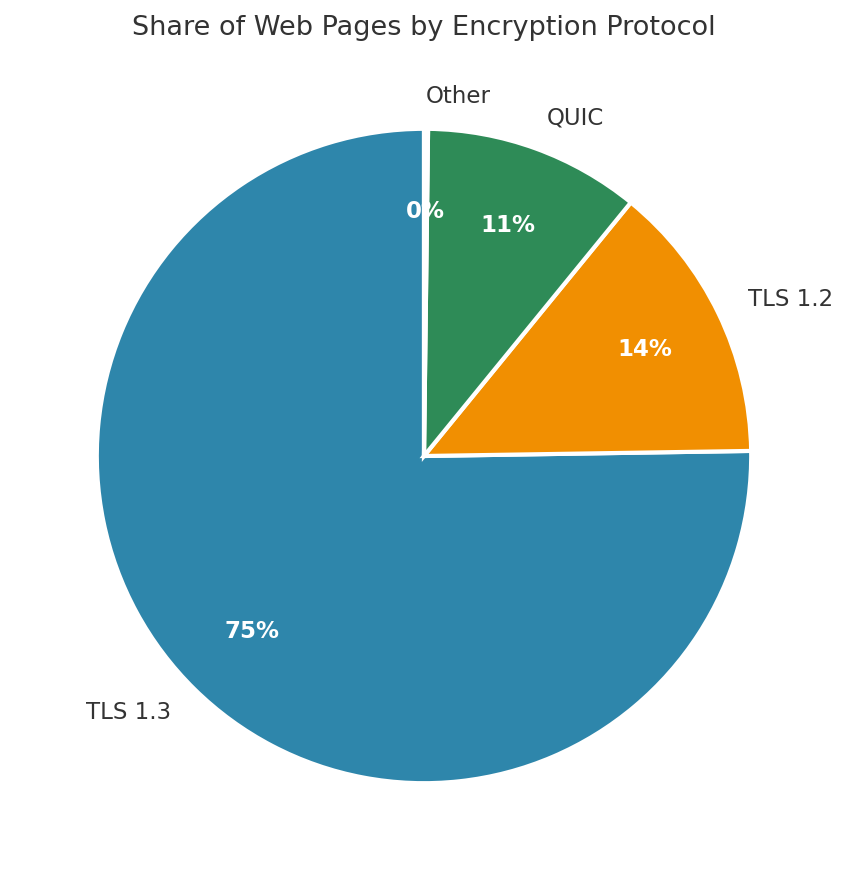
Chart: Share of web pages secured by each TLS protocol version. Source: HTTP Archive, 2025 Web Almanac.
Older protocol versions carry known weaknesses that newer ones were built to close, which is part of why the shift toward TLS 1.3 has moved so quickly across the industry.
AES-256: The Encryption Standard Behind Most Remote Access Tools
AES, short for Advanced Encryption Standard, is the algorithm doing the actual scrambling once a session key is in place. It comes in three key lengths, 128, 192, and 256 bits, with the number referring to how many possible key combinations exist.
“AES-256 uses a key space so large that brute forcing it is not considered feasible with current or foreseeable computing power.”
The 256-bit version is what most business-grade tools rely on, including government systems handling classified material. The algorithm itself is defined in a federal standard, not a vendor’s marketing page, and that pedigree explains why it has held up for more than two decades without a practical break.
| Variant | Key Length | Typical Use |
|---|---|---|
| AES-128 | 128 bit | Consumer apps, lightweight devices |
| AES-192 | 192 bit | Less common, transitional use |
| AES-256 | 256 bit | Business remote access, government systems |
Longer keys mean a vastly larger number of possible combinations an attacker would need to try, which is why the jump from 128 to 256 bit matters more than the numbers alone suggest.
How to Check Whether a Connection Is Actually Encrypted
Most people never verify this themselves, which is exactly how weak setups go unnoticed for months.
- Look for a padlock icon and confirm the certificate details rather than just its presence
- Check the protocol version shown in the browser or client, aiming for TLS 1.2 or newer
- Avoid connecting when a browser or client shows a certificate warning, even once
Understanding how IP addresses reveal your actual network path helps you confirm you are connecting through the expected route rather than an unexpected proxy or relay. None of these checks take more than a minute, yet very few people ever run them before trusting a connection with sensitive work.
Why Weak or Missing Encryption Still Costs Businesses
Encryption is not optional padding. Its absence, or a weak implementation, shows up directly in breach outcomes.
| Key Stat: According to IBM’s 2025 Cost of a Data Breach Report, encryption ranked among the top cost-reducing security controls, lowering the average breach cost by roughly $208,000 compared to organisations without it. |
Weak encryption tends to fail in specific, predictable ways: outdated cipher suites that have known flaws, certificates that go unchecked, or sessions that fall back to older protocol versions without anyone noticing. Understanding how modern encryption algorithms work makes it far easier to spot these gaps before an attacker does, rather than after.
Remote Access Encryption vs. Standard Web Encryption
Both rely on the same underlying cryptography, but they are not solving identical problems.
| What Matters | Remote Access Session | Standard Web Browsing |
|---|---|---|
| Connection length | Often hours, continuous data | Typically brief, per page |
| What is protected | Screen data, keystrokes, files transferred | Page content, form submissions |
| Authentication | Device and user checks, often per session | Mostly server certificate only |
| Key rotation | Frequently rotated during long sessions | Renewed each new connection |
Neither approach is inherently stronger. A remote access session simply has more at stake over a longer period, which is why extra authentication layers matter more here than on a typical browsing session.
Choosing a Remote Access Solution With Strong Encryption
Not every tool markets its encryption clearly, so it helps to know what to actually check before relying on one.
- Confirm the tool uses AES-256 for session data, not an older or unnamed cipher
- Check that connections use TLS 1.2 or newer, never legacy SSL
- Look for per-session key rotation rather than one static key reused indefinitely
- Verify multi-factor authentication is available and enforced, not optional
- Ask whether session data is logged and encrypted at rest, not only in transit
Anyone comparing tools more broadly may also find it useful to review how foundational network protocols evolved to support encryption, since many of the same standards apply across both categories of software. The same due diligence used when assessing emerging security risks more broadly applies almost line for line to a remote access tool, since both lean on identical cryptographic foundations to keep a connection private.
Best Practices for Keeping Encrypted Connections Secure
Strong encryption only works if the surrounding habits support it.
| Warning: Never disable certificate verification to work around a connection error. Bypassing that check removes the one step that confirms you are actually talking to the device you think you are. |
- Keep client software updated so it supports current protocol versions
- Rotate credentials regularly, particularly for shared or administrative accounts
- Disable legacy protocol fallback wherever the software allows it
- Pair encryption with multi-factor authentication on every remote session
Reading the federal encryption standard behind AES-256 is worth doing once, even for non-technical staff, since it explains in plain terms why this particular algorithm became the default rather than something newer or flashier. For anyone diagnosing connection issues along the way, checking how legacy systems affect workplace security can also clarify why some remote sessions behave differently depending on the underlying setup.
FAQs
Is a VPN the same thing as encryption?
No. A VPN is a tool that uses encryption as one of its features, alongside routing and network access. Encryption itself is the underlying process of scrambling data, used by VPNs, remote access software, and standard web browsing alike.
Can encrypted traffic still be hacked?
Properly implemented AES-256 encryption is not practically breakable with current technology. Most real-world breaches happen through stolen credentials, phishing, or misconfiguration rather than brute-forcing the encryption itself.
Why does the TLS version matter if the data is encrypted either way?
Older TLS versions contain known vulnerabilities that have since been patched in newer releases. Using an outdated version means relying on encryption with documented weaknesses, even though the connection still technically appears secure.
Does encryption slow down a remote connection?
Modern hardware handles AES encryption with minimal overhead, often accelerated directly by the processor. Any slowdown noticeable to users usually comes from network bandwidth or latency, not the encryption process itself.
What is the difference between encryption at rest and in transit?
Encryption in transit protects data while it moves between devices, such as during a remote session. Encryption at rest protects data stored on a disk or server. A secure setup applies to both, not just one.
Conclusion
Encryption is the quiet layer that makes remote access trustworthy, converting every keystroke and screen update into something no outsider can read without the right credentials. The strongest setups combine AES-256, current TLS versions, and proper authentication rather than leaning on any single safeguard alone.
Businesses that understand these basics are far better placed to ask the right questions before trusting a tool with sensitive company data, and staff who know what a padlock icon actually confirms are less likely to be fooled by a connection that merely appears secure.