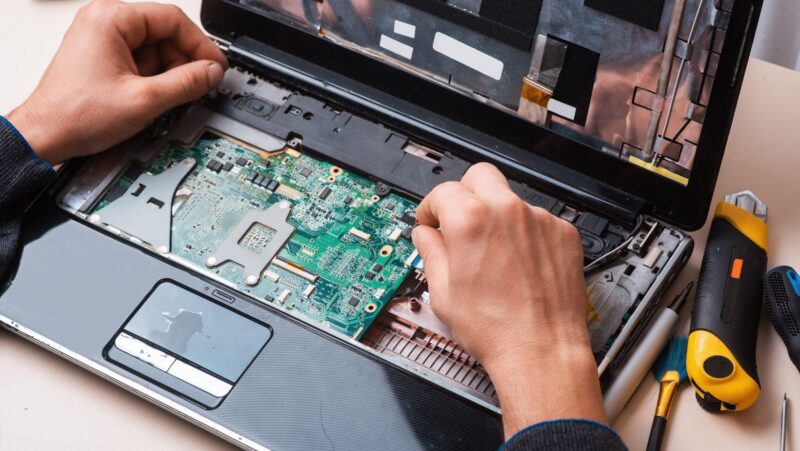
A broken printer driver, a frozen application, a settings change nobody can find, these used to mean waiting for someone to walk over with a screwdriver and a shrug. Now a technician sitting in another country can see the exact same screen, move the same cursor, and fix the problem in minutes.
The industry benchmark for resolving an issue on the first contact sits around 70%, and the tools used during that contact play a direct role in whether a technician hits that number or falls short of it. Here is what actually happens during a remote support session, and why the technology behind it matters more than most users realise.
Key Takeaways
- Remote desktop support lets a technician view and control a device’s screen from anywhere, without ever being in the same room as the hardware.
- The industry benchmark for first contact resolution sits around 70%, and the tools used during a session directly influence whether technicians hit that number.
- Remote support, remote access, and remote control get used interchangeably but describe slightly different levels of technician involvement.
- Security considerations, session logging, permission scoping, and encrypted connections, matter as much as speed during a support session.
- Verifying who actually initiated a support request is worth the extra thirty seconds, given how often scammers impersonate technical support.
What Remote Desktop Support Actually Looks Like Day to Day
A typical remote session starts with a user describing a problem that often does not match what is actually wrong. The technician requests a connection, the user accepts a prompt or shares a session code, and within seconds the technician is looking at the same desktop the user sees.
From there, the technician can move the cursor, open menus, check settings, and run diagnostic tools exactly as if they were sitting at the keyboard. Reliable remote desktop support for end users depends on that connection staying stable and responsive, since a laggy session turns a five minute fix into a frustrating back and forth for everyone involved.
None of this replaces every on site visit. Hardware failures, physical cable issues, and anything requiring a screwdriver still need someone in the room. But the share of tickets that genuinely require physical presence has shrunk considerably as remote tools have matured.
The Technology Behind a Remote Support Session
Several pieces work together behind the scenes to make a remote session feel almost as direct as being physically present.
Screen Viewing and Control
The core of any remote session is screen sharing paired with input control, letting the technician’s mouse and keyboard commands reach the remote machine in near real time. Modern tools compress and stream the screen efficiently enough that even a moderate home internet connection can support a smooth session.
File Transfer and Diagnostic Tools
Beyond viewing the screen, most remote support tools let a technician transfer files, pull system logs, or run scripts without asking the user to do anything more than approve the initial connection. This is often what separates a quick fix from a session that drags on for an hour of talking someone through steps they do not fully understand.
Remote Support vs Remote Access vs Remote Control: Clearing Up the Terms
These three terms get used loosely, but they describe different levels of what is actually happening during a session.
|
What Matters |
Remote Support |
Remote Access |
Remote Control |
|
Who initiates |
Typically the end user, requesting help |
The account owner, reaching their own device |
Either party, depending on the tool |
|
Typical duration |
Short, issue specific session |
Can be ongoing or scheduled |
Varies by use case |
|
Common scenario |
Help desk fixing a user’s laptop |
An employee reaching their office computer |
Managing a server without local hardware |
|
Session visibility |
User usually watches in real time |
User may not be present at all |
Depends on configuration |
The overlap between these categories is real, and most remote desktop tools support all three modes depending on how they are configured for a given session. Understanding
How a personal VPN connection gets established helps clarify the distinction further, since a VPN extends network access broadly while a remote desktop session controls one specific machine.
Why First Contact Resolution Depends on the Right Tools
Fixing something remotely is only valuable if it actually gets fixed the first time someone reaches out for help.
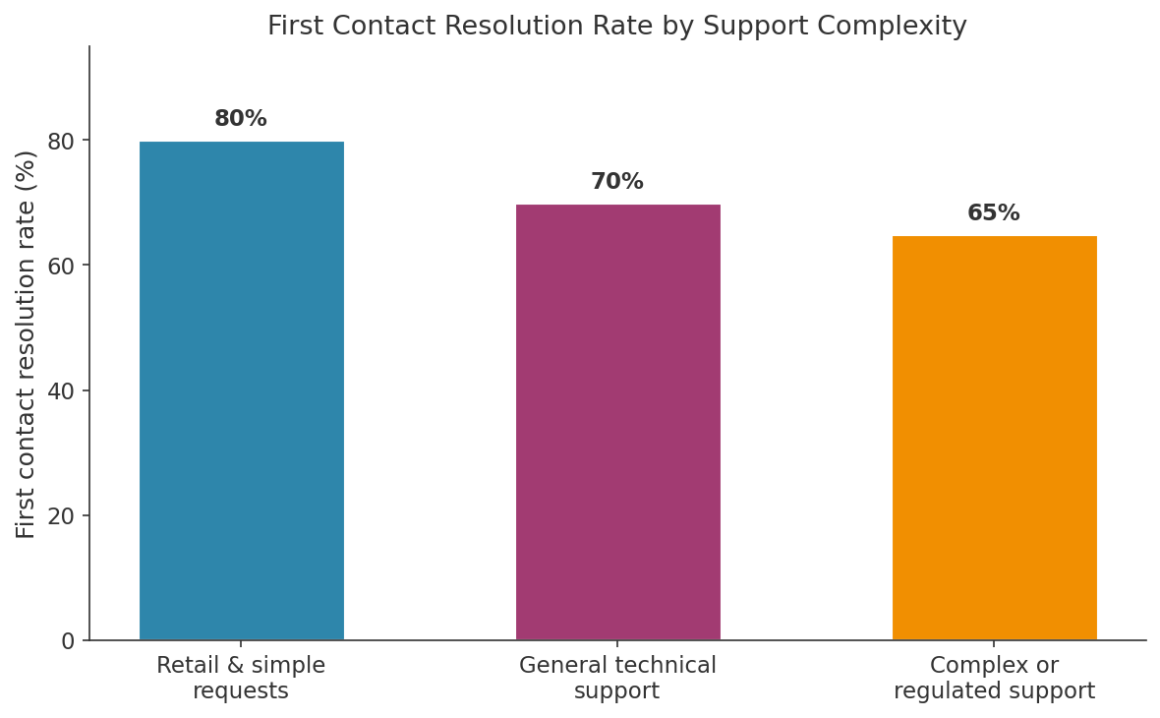
Chart: First contact resolution rate by support category.
“The industry benchmark average for first contact resolution sits at 70%, with technical support consistently landing on the lower end of that range.”
Technical support landing there is not surprising given how much troubleshooting depends on actually seeing what is wrong rather than guessing from a verbal description. Reviewing
Industry benchmarks for resolving issues on the first contact makes clear why the tooling technicians use matters as much as their technical knowledge, since even a skilled technician cannot fix what they cannot see. A technician armed with clear screen visibility and reliable input control closes that gap far faster than one working from a phone call alone.
Security Considerations for Remote Desktop Support
A remote session grants real access to a device, which means it deserves the same scrutiny as any other entry point into a network.
|
Key Principle: Every remote support session should require explicit user consent to begin, log who connected and for how long, and end automatically once the technician disconnects. None of these should be optional settings buried in an admin panel. |
Understanding
How a structured incident response process works helps frame why remote support tools get evaluated so carefully by IT departments, since a poorly secured remote session can become exactly the kind of entry point attackers look for. Reviewing the
Steps to secure a device’s network identity is useful context here too, since a remote session ultimately rides on the same network connection that everyday browsing and file transfers depend on, and weaknesses in one tend to expose the other.
Common Challenges Technicians Face Working Remotely
Most of the real difficulty in remote support has nothing to do with the technology itself.
- Users who struggle to describe what they are seeing, slowing down initial diagnosis
- Home networks with inconsistent bandwidth that make screen sharing choppy
- Permission prompts that users dismiss without reading, delaying the connection
- Devices with outdated software that limit which remote tools will even connect
|
Warning: Never proceed with a remote session if a user cannot confirm who initiated the request. Impersonation scams involving fake technical support cost older Americans alone more than 159 million dollars in reported losses in a single year. |
Reviewing how costly these impersonation scams have become makes clear why a moment of hesitation before granting access is never wasted time. Reviewing the
Cybersecurity risks a VPN helps reduce is a useful companion topic for technicians, since many of the same social engineering tactics used against home network users show up in fake support call scams, just aimed at gaining remote access instead of stealing credentials directly.
Best Practices for a Smooth Remote Support Session
A few habits consistently separate an efficient remote session from a frustrating one.
- Confirm the user’s identity before requesting a remote connection
- Explain what you are about to do before doing it, especially for anything visible on screen
- Keep sessions time boxed and end them immediately once the issue is resolved
- Document what was changed, in case the same device needs support again later
- Encourage users to update software regularly, since outdated systems cause a disproportionate share of repeat tickets
Technicians who also understand
How VPN and VPS access actually differ tend to explain networking concepts to confused users more clearly, since the distinction between reaching one specific device and reaching an entire private network trips up plenty of otherwise capable users.
Video: “Secure Remote Access vs. VPN” — https://www.youtube.com/watch?v=fyJRyQKDkX4
This video is a useful primer for anyone who wants to understand how remote access security concepts apply across different support scenarios.
FAQs
Is remote desktop support safe?
When configured properly, with user consent, encrypted connections, and session logging, remote desktop support is generally safe. Risk increases mainly when users are tricked into granting access to someone impersonating legitimate support.
Can a technician access a device without the user knowing?
Reputable remote support tools require explicit consent for each session and typically display a visible indicator while the connection is active, though enterprise device management tools may allow pre-authorised access on company owned hardware.
Why does my internet speed affect a remote support session?
Screen sharing requires continuously streaming visual data, so a slow or unstable connection can make the technician’s actions appear delayed, which slows down diagnosis and fixes considerably.
What should I do if I get an unexpected remote support request?
Verify the request through a separate channel, such as calling your IT department or the company directly, before accepting any connection request, since unsolicited remote access requests are a common social engineering tactic that regulators continue to flag as a growing source of financial loss.
Do remote technicians need special training compared to on site technicians?
Largely the same technical skills apply, but remote technicians benefit from stronger communication skills, since they rely entirely on the user’s description and cooperation rather than being able to physically inspect anything themselves.
Conclusion
Remote desktop support has quietly become the default way most technical problems get solved, not because it is a lesser substitute for someone showing up in person, but because it is often faster and just as capable. The technology behind it, screen sharing, encrypted connections, and careful permission handling, has matured to the point where a technician on the other side of the world can fix a problem as effectively as one standing in the room. Getting the security and communication right matters just as much as the technology itself, since neither one works well without the other, and the best sessions tend to be the ones users barely notice happening at all.
References
Zendesk, What Is First Contact Resolution (FCR)? Benefits + Best Practices, 2026 — https://www.zendesk.com/blog/customer-experience/retention/first-contact-resolution-friend-foe-frenemy/
Fortinet, What Is Incident Response? Process and Frameworks — https://www.fortinet.com/resources/cyberglossary/incident-response
Federal Trade Commission, FTC Issues Annual Report to Congress on Agency’s Actions to Protect Older Adults, 2025 — https://www.ftc.gov/news-events/news/press-releases/2025/12/ftc-issues-annual-report-congress-agencys-actions-protect-older-adults
Fact Check: All statistics and data points in this article were verified against original sources as of 20 August 2026. Sources are listed in the References section.